
What is eSIM? Everything You Need to Know
At a glance
From eSIM basics to pros/cons and travel usage.
TL;DR (Summary)
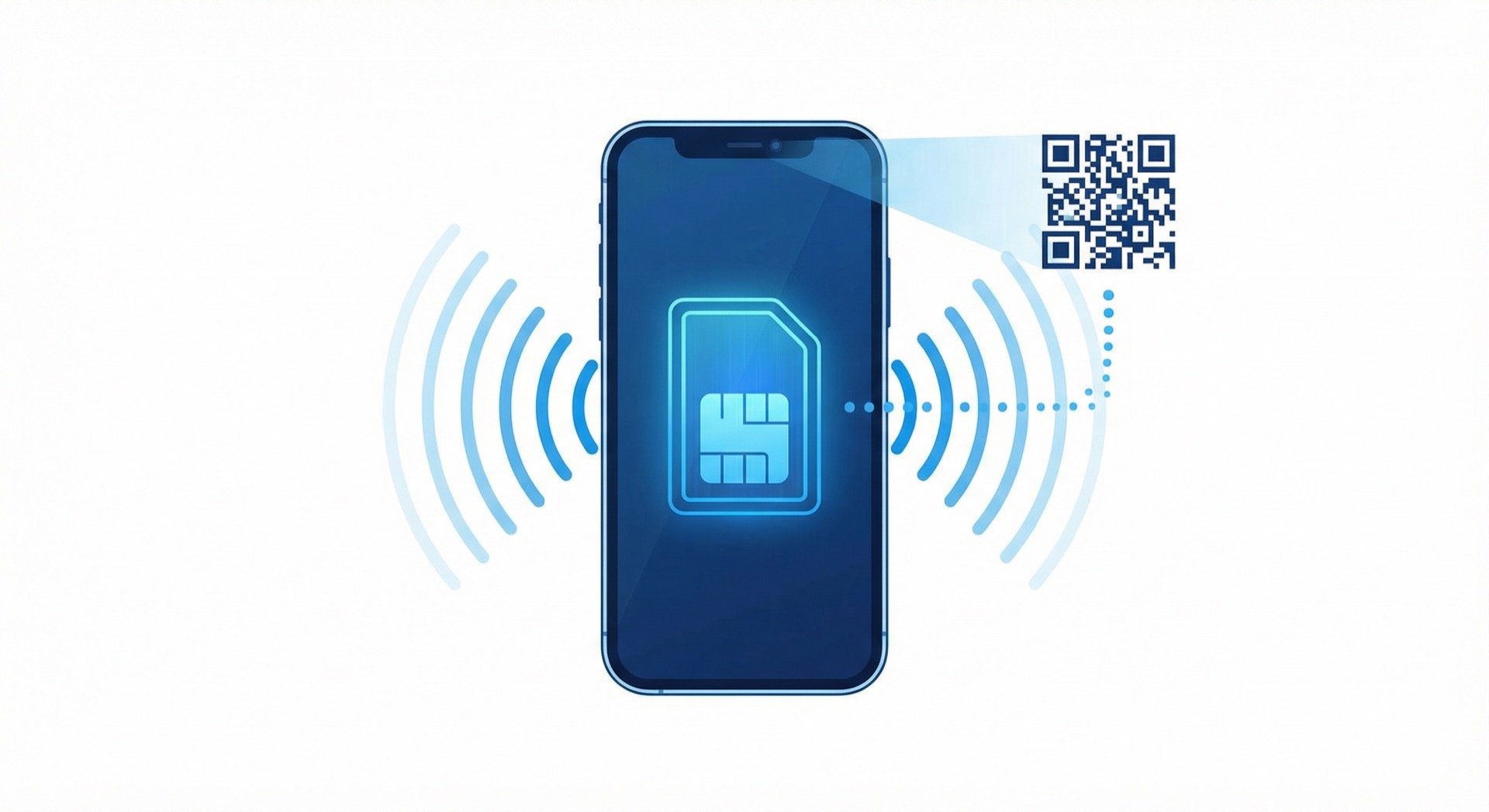
- eSIM is a digital SIM embedded in your phone; you download carrier profiles via QR code or app.
- For travel, keeping your home number (physical SIM) and using eSIM for data only is usually the most convenient and affordable.
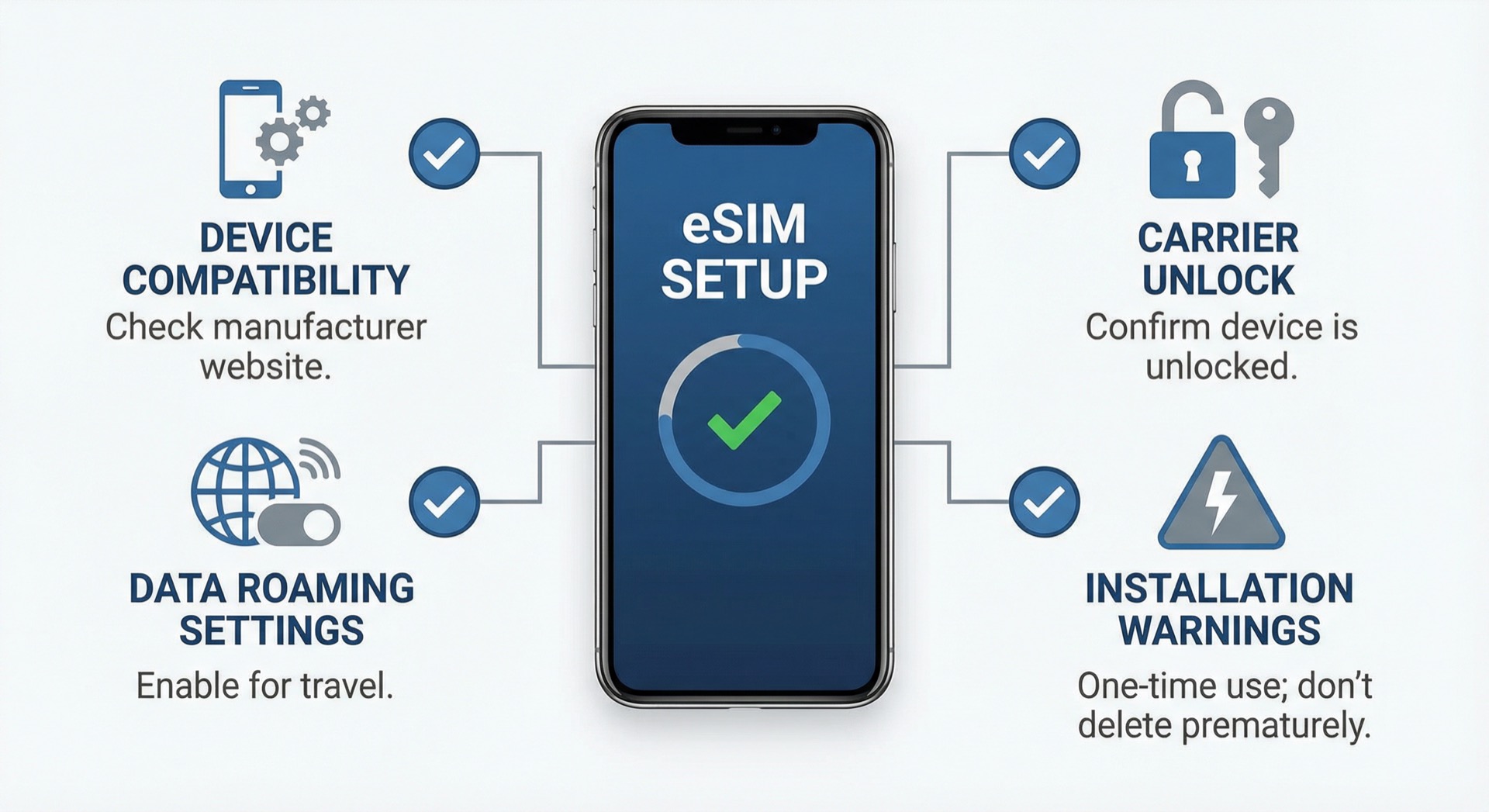
- Before installing, check: (1) device eSIM support, (2) carrier unlock status, (3) data roaming settings, (4) reinstallation policy after deletion.
What is eSIM?
eSIM (Embedded SIM) is an industry-standard digital SIM that downloads carrier profiles (subscriber information) to a chip embedded inside the device. Unlike physical USIM cards, you can activate plans by scanning QR codes, using carrier apps, or manual entry (SM-DP+ etc.) without inserting a card.
Background of eSIM
Traditional physical SIM cards have been used for over 30 years since their introduction in 1991. However, as smartphones became thinner and waterproofing became more important, physical SIM trays became a design constraint. Additionally, the inconvenience of swapping SIM cards when traveling abroad or changing carriers was continuously pointed out.
Against this backdrop, GSMA (GSM Association) announced the eSIM standard in 2016. Apple began supporting eSIM with the iPhone XS/XR in 2018, and major manufacturers like Samsung Galaxy and Google Pixel quickly followed suit.
The iPhone 15 series (US models) launched in 2023 completely removed the physical SIM slot and only supports eSIM, marking eSIM as a standard feature in smartphones.
How eSIM Works
eSIM is a small chip soldered to the mainboard during device manufacturing. This chip ships empty and activates when users download carrier profiles.
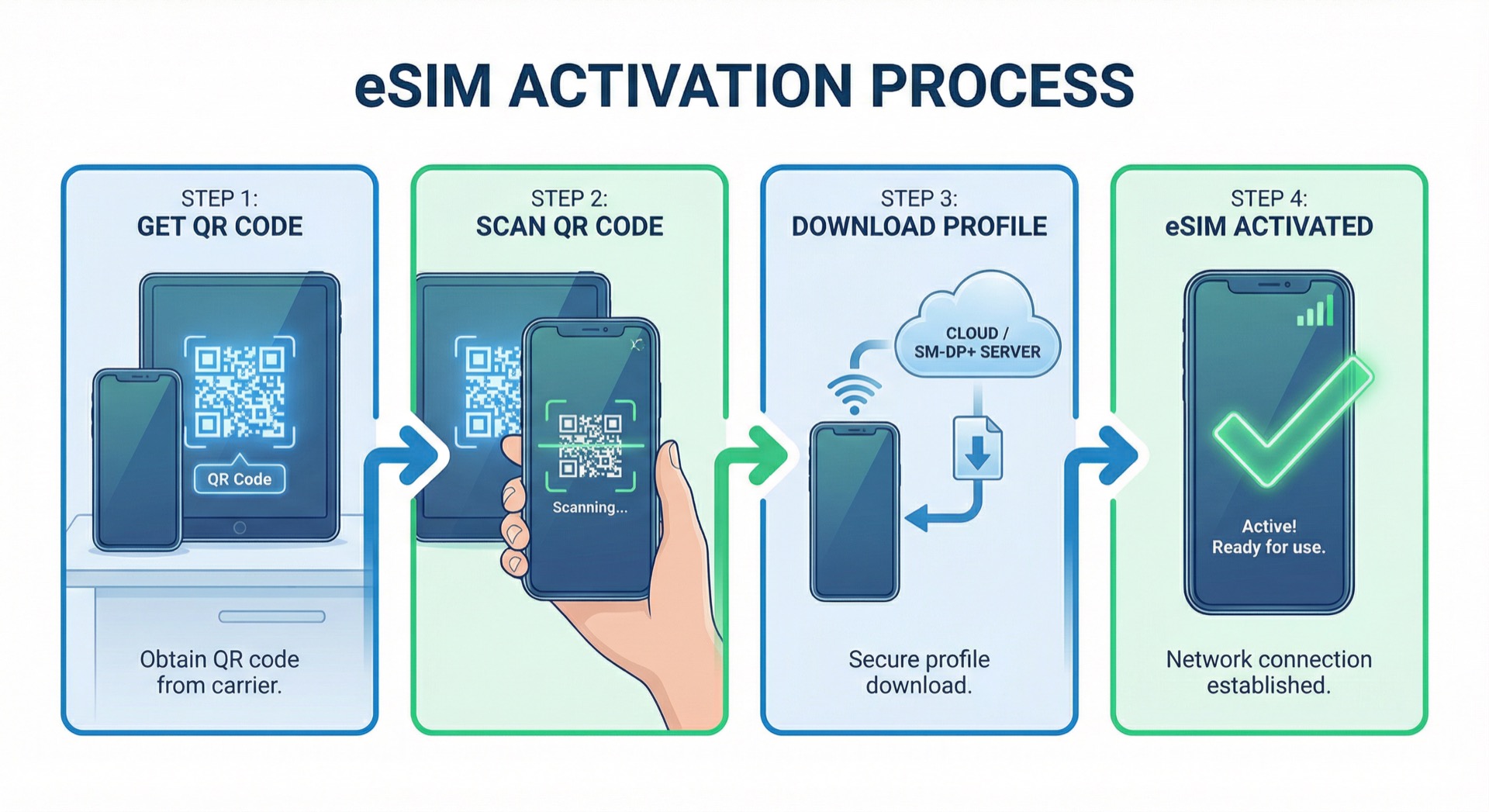
Profile Download Process:
- Carrier or eSIM provider issues QR code or activation code
- User scans QR code or enters code in device settings
- Device connects to SM-DP+ (Subscription Manager Data Preparation) server
- Encrypted profile downloads to eSIM chip
- Profile activates and is immediately ready to use
For travel, you can install before departure and use data immediately upon arrival, without the hassle of buying or swapping local SIMs at the airport.
Terms Explained (Installation/Activation/Provisioning)
First-time eSIM users often get confused by these terms.
- Provisioning (Purchase): Buying a plan from a provider and receiving a QR code or activation code
- Installation (Profile download): Downloading the eSIM profile to your phone (usually requires Wi-Fi)
- Activation/Start using: When the device actually gets signal and data works
(Policies vary: "starts at install" vs "starts when connected locally" etc.)
Important: Many travel eSIMs distinguish between "installation" and "activation." For example, even if you install before departure, the validity period often starts when you first connect to the local network. Always verify before purchase.
Why is eSIM Advantageous for Travel?
1) Install Before Departure, Use Immediately Upon Arrival
No shipping or pickup required. Once installation is complete, you can use maps and messaging at the airport right away. Especially useful for late-night arrivals when airport SIM shops are closed.
Real Usage Scenario:
- 3 days before departure: Purchase eSIM and receive QR code
- 1 day before departure: Install eSIM profile at home via Wi-Fi (5 minutes)
- Arrive at local airport: Automatically connects to local network when airplane mode is disabled
- Airport exit: Immediately search Google Maps for hotel directions
2) Keep Home Number + Affordable Data
The most common setup:
- Voice/SMS: Keep home USIM as primary
- Cellular data: Set to travel eSIM
This way, you use eSIM for maps/messaging/search while still receiving calls and texts on your home number.
To avoid high roaming charges, turn off data roaming on your home USIM and use eSIM for data only. See How to turn off data roaming on home SIM.
Cost Comparison (Japan 7 days):
- Carrier data roaming: $40~60
- Pocket WiFi rental: $25~40 + deposit
- Travel eSIM: $6~15 (depending on capacity)
3) Reduced Risk of Loss or Damage
No physical card means no risk of loss or damage. No need to carry separate devices like pocket WiFi, and no situations where you can't open the SIM tray because you lost the SIM pin.
4) Convenience for Multi-Country Travel
When traveling through multiple European countries or touring Southeast Asia, a single regional eSIM can cover multiple countries. No need to purchase and swap SIM cards for each country.

eSIM vs USIM Comparison
| Category | Physical USIM | eSIM |
|---|---|---|
| Form | Plastic card | Embedded chip + digital profile |
| Replacement | Physically removable and transferable to other devices | Profile deletion and reinstallation (limited by provider policy) |
| Installation | Insert into SIM tray | Scan QR code or enter code |
| Loss risk | Yes (small size) | No (embedded) |
| Dual SIM | 2 USIMs or USIM+eSIM | Multiple eSIM profiles storable (simultaneous activation limited by device) |
| Carrier change | Requires new SIM | Instant online change |
| Travel abroad | Local purchase or pre-delivery | Online purchase and instant installation |
For a detailed comparison, see USIM vs eSIM Complete Comparison.
eSIM-Compatible Devices
Most recent smartphones support eSIM. For definitive confirmation, see eSIM Compatible Devices.
Major Compatible Devices (as of 2024):
iPhone
- iPhone 15 series (all models)
- iPhone 14 series (all models)
- iPhone 13 series (all models)
- iPhone 12 series (all models)
- iPhone 11 series (all models)
- iPhone XS, XS Max, XR and later
- iPhone SE (2020, 2022)
Samsung Galaxy
- Galaxy S24 series
- Galaxy S23 series
- Galaxy S22 series
- Galaxy S21 series and later
- Galaxy Z Fold/Flip series (3rd generation and later)
- Galaxy A series (select models)
Google Pixel
- Pixel 8, 8 Pro
- Pixel 7, 7 Pro, 7a
- Pixel 6, 6 Pro, 6a
- Pixel 5, 5a
- Pixel 4, 4 XL, 4a and later
How to Check:
- iPhone: Settings > General > About > EID or Digital SIM entry
- Android: Settings > Connections > SIM manager > Add eSIM menu
Pre-Purchase Checklist (Practical)
Checking these 7 items greatly reduces failure rates.
1. Device eSIM Support
Use the methods above to verify your device supports eSIM. Most recent devices like iPhone XS/XR and later, Galaxy S21 and later support it.
2. Carrier Lock Status
Most important checkpoint. If carrier locked, overseas eSIMs may not work at all.
How to Check:
- iPhone: Settings > General > About > Carrier Lock entry
- Android: Contact carrier customer service
- Lock may persist even after installment completion, so always verify
How to Unlock:
- Major carriers: Customer service or store visit
- Foreign-purchased devices: Contact carrier in purchase country
3. Plan Start Conditions
eSIM providers have different validity period start times.
- At purchase: Starts from purchase completion (rare)
- At installation: Starts from QR code scan completion
- At local connection: Starts when first connected to local network (most common)
Purchase/install at appropriate time based on departure schedule.
4. Data-Only or Voice/SMS Included
Most travel eSIMs are data-only. If you need voice or SMS:
- Keep home SIM with dual SIM (recommended)
- Or purchase eSIM with voice features (expensive)
- Or use internet calling apps like WhatsApp, Telegram
5. Tethering (Hotspot) Support
If you plan to connect laptops or tablets, verify tethering support. Some providers restrict tethering or charge extra.
6. Speed Policy
Read plan descriptions carefully.
- High-speed nGB + throttled unlimited: Most common. Unlimited usage at low speed (128kbps~512kbps) after high-speed capacity exhausted
- Fully unlimited high-speed: Expensive but convenient
- Daily cap: Limited or throttled after daily nGB usage
7. Reinstallation Policy (Most Important!)
Most travel eSIMs allow only one-time installation. If deleted, re-download is often impossible, so never delete during travel.
- Always verify before carrier change or device reset
- Some providers allow reinstallation but charge extra
- May need to repurchase if device breaks
Precautions
1. Install on Wi-Fi
Install on stable Wi-Fi. If network disconnects or you leave the screen during installation, the profile may become corrupted.
Installation Precautions:
- Battery sufficiently charged (minimum 50%)
- Stable Wi-Fi connection (home Wi-Fi preferred over public)
- Avoid calls or other apps during installation
- May take 5~10 minutes to complete
2. Delete eSIM Last
Most are one-time, so recovery after deletion is difficult. Always verify provider policy before deletion.
When NOT to delete:
- During travel (within validity period)
- When data remains
- Before verifying reinstallation policy
When safe to delete:
- After validity period completely ends
- When provider explicitly states reinstallation is possible
- When transferring to new device and provider supports transfer
3. Turn Off Home SIM Data Roaming
If home SIM connects for data abroad, high roaming charges may occur. Always turn off data roaming on home SIM.
How to Configure:
- iPhone: Settings > Cellular > [Select home SIM] > Data Roaming OFF
- Android: Settings > Connections > SIM manager > [Select home SIM] > Data Roaming OFF
See How to turn off home SIM data roaming for details.
4. If Data Doesn't Work Locally
Verify data roaming ON, cellular data line set to eSIM, and check if APN required.
Checklist:
- Is eSIM profile activated?
- Is data roaming ON?
- Is cellular data line set to eSIM?
- Is network selection set to automatic?
- Have you toggled airplane mode?
- Have you rebooted the device?
See When data doesn't work abroad for troubleshooting.
Pros and Cons Summary
Advantages
✅ No physical SIM card needed - no loss risk
✅ Instant online purchase and installation - no shipping wait
✅ Multiple profiles storable - switch by destination
✅ Dual SIM utilization - keep home number while using local data
✅ Environmentally friendly - reduced plastic SIM card production
✅ Easy carrier switching - instant online change
✅ Design freedom - thinner devices with better waterproofing
Disadvantages
❌ Device limitations - older devices unsupported
❌ Reinstallation restrictions - mostly one-time installation only
❌ Device transfer difficulty - complex to move to new phone
❌ Carrier lock issues - unlock required
❌ Internet required for installation - Wi-Fi or data connection needed
❌ Technical knowledge needed - somewhat complex for beginners
Frequently Asked Questions (FAQ)
Q1. Can I install multiple eSIMs?
A: Yes. iPhone can store 8+ eSIM profiles and activate up to 2 simultaneously (one may be physical SIM). Android varies by device but most support multiple profiles.
Q2. Can I share eSIM with others?
A: No. eSIM profiles are linked to a specific device's EID (eSIM Identifier) and cannot be transferred to other devices. Sharing QR codes won't work on other people's devices.
Q3. Does eSIM transfer when changing devices?
A: Most travel eSIMs cannot be transferred. Some domestic carrier eSIMs support transfer but require separate application to the carrier. Always verify with provider before device change.
Q4. Is internet required after eSIM installation?
A: Wi-Fi or data connection is required during installation, but after installation completes, the profile persists without internet. Locally, you can use only the eSIM's data connection.
Q5. Is eSIM more expensive?
A: Travel eSIMs are often cheaper than physical SIMs or pocket WiFi. No shipping costs or rental deposits, and online sales reduce distribution costs.
Q6. Can I receive calls while using eSIM?
A: If you keep your home SIM with dual SIM, you can receive calls on your home number. However, data-only eSIMs cannot receive calls.
Q7. Does eSIM consume more battery?
A: Battery consumption is nearly identical to physical SIM. However, using dual SIM (physical SIM + eSIM) manages two networks simultaneously, so battery consumption may increase slightly.
References (Official Documentation)
- Apple: Set up eSIM on iPhone
- Samsung: Galaxy eSIM Features and Usage
- GSMA: eSIM Official Standard Documentation
Next Steps
Now that you understand eSIM, it's time to actually install and use it.
-
Installation Guides by Device
-
Travel Preparation
-
Troubleshooting
Last Updated: January 15, 2024
Author: eSIM MOA Guide Team
