
How to Choose eSIM Data Amount for Travel
At a glance
Estimate data needs by trip length and usage.
TL;DR (Data Selection Formula)
- Basic Formula: Travel days × Daily estimated usage
- If using lots of Wi-Fi, reduce by 20-40%; if using tethering/videos, increase by 30-100%
- Safety Margin: Recommended to purchase 120-150% of calculated amount
Why is Data Amount Selection Important?
Running out of data during travel can cause inconveniences like not being able to check maps at crucial moments or confirm reservations. Conversely, buying too much wastes money.
Real Examples:
- Insufficient: Bought 3GB for 7-day Japan trip → Ran out on day 4 → Remaining 3 days at low speed or additional purchase
- Appropriate: Bought 7GB for 7-day Japan trip → Used comfortably → 1GB left over
- Excessive: Bought 20GB for 7-day Japan trip → Used only 5GB → Wasted 15GB
Learn how to select just the right amount through this guide.
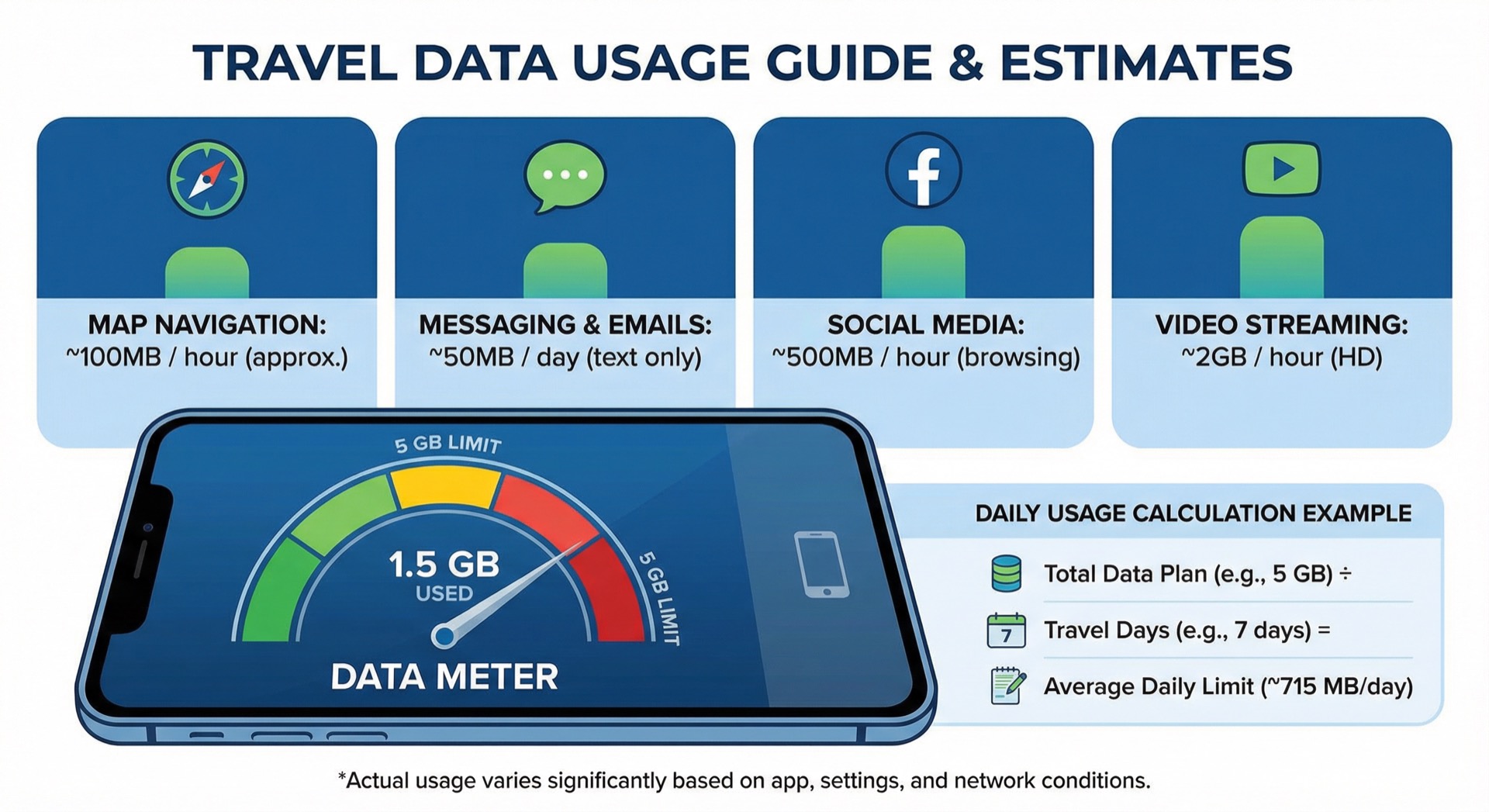
Data Usage by Activity (Based on Actual Measurements)
Here's a summary of actual data consumption for each activity during travel.
Maps/Navigation
Google Maps:
- Route search (once): About 1-3MB
- Real-time navigation (1 hour): About 50-100MB
- Offline map download: 50-500MB per region (download via Wi-Fi beforehand)
Daily Average (Tourism-focused):
- Light (hotel-tourist spot round trip): 50-100MB
- Regular (moving to multiple places): 100-200MB
- Heavy (rental car, frequent searches): 200-400MB
Saving Tips:
- Download offline maps in advance
- Search multiple routes at once
- Register major places as favorites on Wi-Fi
Messaging/Email
KakaoTalk:
- 1,000 text messages: About 1-2MB
- Sending 1 photo: About 1-3MB
- Sending 1 minute of video: About 10-30MB
Email:
- 100 text emails: About 5-10MB
- Emails with attachments: Depends on file size
Daily Average:
- Light (text-focused): 20-50MB
- Regular (photo sharing): 50-100MB
- Heavy (video sharing): 100-300MB
Saving Tips:
- Compress photos before sending
- Send videos on Wi-Fi
- Turn OFF auto-download
Social Media (SNS)
Instagram:
- Feed scrolling (10 min): About 50-100MB
- Story viewing (10 min): About 100-200MB
- Photo upload (1 photo): About 3-5MB
- Reels viewing (10 min): About 150-300MB
Facebook:
- Feed scrolling (10 min): About 30-80MB
- With video auto-play: Data surges
Daily Average:
- Light (occasional checking): 100-200MB
- Regular (frequent checking, uploads): 300-500MB
- Heavy (lots of video watching): 500MB-1GB
Saving Tips:
- Enable "Data Saver Mode" in app settings
- Turn OFF video auto-play
- Upload only on Wi-Fi
Video Streaming
YouTube:
- 480p (SD): About 500-700MB per hour
- 720p (HD): About 1-1.5GB per hour
- 1080p (Full HD): About 2-3GB per hour
Netflix:
- Low quality: About 300MB per hour
- Standard quality: About 700MB per hour
- High quality: About 3GB per hour
Daily Average:
- Light (rarely watch): 0-100MB
- Regular (occasionally while traveling): 200-500MB
- Heavy (daily viewing): 1-3GB
Saving Tips:
- Watch only on hotel Wi-Fi
- Set quality to 480p or lower
- Use offline download (on Wi-Fi)
Video Calls
Zoom/Google Meet:
- Voice call: About 50-100MB per hour
- Video call (regular quality): About 500-800MB per hour
- Video call (high quality): About 1.5-2GB per hour
FaceTime/KakaoTalk Video Call:
- About 300-600MB per hour
Daily Average:
- Light (rarely): 0-50MB
- Regular (10-20 min): 100-200MB
- Heavy (business meeting 1+ hour): 500MB-2GB
Tethering (Hotspot)
Connecting a laptop or tablet drastically increases data consumption.
Laptop Use:
- Web browsing: About 100-300MB per hour
- Email work: About 50-150MB per hour
- Cloud sync: Several GB depending on file size
- Video conferencing: About 1-2GB per hour
Warning: Laptops consume much more data than mobile devices. If OS updates or app updates run automatically, several GB can be consumed instantly.
Daily Average Usage by Travel Style
Light User
Characteristics:
- Mainly maps/navigation
- Simple messaging contact
- SNS only on Wi-Fi
- Rarely watch videos
- Actively use hotel/cafe Wi-Fi
Daily Estimated Usage: 300-700MB
Recommended For:
- Package tours (less movement)
- Middle-aged and senior travelers
- Those accustomed to data saving
7-Day Trip Recommended Amount: 3-5GB
Regular User
Characteristics:
- Frequently use maps/navigation
- Share photos via messaging
- Check and upload to SNS regularly
- Occasionally watch videos (short videos)
- Appropriately combine Wi-Fi and data
Daily Estimated Usage: 700MB-1.5GB
Recommended For:
- Independent travel (lots of movement)
- Travelers in their 20s-40s
- Typical smartphone usage patterns
7-Day Trip Recommended Amount: 7-10GB
Heavy User
Characteristics:
- Constantly use maps (rental car, etc.)
- Watch lots of SNS videos
- Frequently watch YouTube/Netflix
- Connect laptop via tethering
- Video conferencing/business use
Daily Estimated Usage: 1.5-3GB
Recommended For:
- Business trips
- Digital nomads
- Heavy video content consumers
- Multiple device users
7-Day Trip Recommended Amount: 15-20GB or Unlimited
Recommended Amount by Trip Duration (Detailed)
2-3 Days (Weekend Trip)
Light User
- Recommended Amount: 1-2GB
- Plan Type: Fixed capacity
- Budget: About 5,000-8,000 KRW
Usage Scenario:
- Depart Friday evening → Return Sunday evening
- Mainly visit tourist spots, search for restaurants
- Use hotel Wi-Fi
- Upload photos after returning
Regular User
- Recommended Amount: 2-3GB
- Plan Type: Fixed capacity or high-speed + low-speed unlimited
- Budget: About 8,000-12,000 KRW
Usage Scenario:
- Independent travel, lots of movement
- Real-time SNS uploads
- Occasional video watching
Heavy User
- Recommended Amount: 3-5GB
- Plan Type: High-speed + low-speed unlimited or fully unlimited
- Budget: About 12,000-20,000 KRW
Usage Scenario:
- Business + travel
- Need tethering
- Video content consumption
5-8 Days (One Week Trip)
Light User
- Recommended Amount: 3-5GB
- Plan Type: Fixed capacity
- Budget: About 10,000-15,000 KRW
Usage Scenario:
- Relaxed schedule
- Sufficient use of hotel/accommodation Wi-Fi
- Use data only while traveling
Regular User
- Recommended Amount: 7-10GB
- Plan Type: High-speed + low-speed unlimited (recommended)
- Budget: About 15,000-25,000 KRW
Usage Scenario:
- Most common travel pattern
- Balanced use of maps, SNS, messaging
- Occasional video watching
Recommended Plan Example:
- "High-speed 5GB + unlimited low-speed after"
- Maps/messaging sufficient at low speed even after high-speed capacity exhausted
Heavy User
- Recommended Amount: 12-20GB
- Plan Type: Large capacity or fully unlimited
- Budget: About 25,000-45,000 KRW
Usage Scenario:
- Business trip
- Rental car travel (constant map use)
- Heavy video content consumption
- Frequent tethering
10-15 Days (Long-term Travel)
Light User
- Recommended Amount: 5-8GB
- Plan Type: Fixed capacity
- Budget: About 15,000-25,000 KRW
Usage Scenario:
- Long stay in one city
- Mainly use accommodation Wi-Fi
- Data only when going out
Regular User
- Recommended Amount: 10-15GB
- Plan Type: High-speed + low-speed unlimited or large capacity
- Budget: About 25,000-40,000 KRW
Usage Scenario:
- Moving between multiple cities
- Regular data usage
- Appropriately combine Wi-Fi and data
Heavy User
- Recommended Amount: 20-30GB or unlimited
- Plan Type: Fully unlimited (recommended)
- Budget: About 40,000-70,000 KRW
Usage Scenario:
- Long-term business trip
- Digital nomad
- Need lots of business data
- Multiple device tethering
30 Days (One Month Stay)
Light User
- Recommended Amount: 8-12GB
- Plan Type: Fixed capacity
- Budget: About 25,000-40,000 KRW
Regular User
- Recommended Amount: 15-25GB
- Plan Type: Large capacity or high-speed + low-speed unlimited
- Budget: About 40,000-60,000 KRW
Heavy User
- Recommended Amount: 30GB+ or unlimited
- Plan Type: Fully unlimited (essential)
- Budget: About 60,000-100,000 KRW
Note: For 30-day long stays, local SIM cards or local carrier plans may be cheaper. Compare before choosing.
Practical Data Calculation Examples
Example 1: Tokyo 5-Day Independent Trip (2 people, Regular Users)
Trip Information:
- Duration: 5 days 4 nights
- People: 2 (each with smartphone)
- Style: Tourism-focused, SNS uploads
Daily Estimated Usage (per person):
- Maps/Navigation: 150MB
- Messaging (with photos): 80MB
- SNS (Instagram uploads): 400MB
- Web search: 100MB
- Occasional videos: 200MB
- Total: About 930MB/day
5-Day Total Usage:
- 930MB × 5 days = 4,650MB ≈ 4.7GB
Safety Margin (30% additional):
- 4.7GB × 1.3 = 6.1GB
Recommended Plan:
- 7GB plan each (with room)
- Or High-speed 5GB + low-speed unlimited (value)
Budget:
- 7GB plan: About 15,000 KRW per person × 2 = 30,000 KRW
- High-speed 5GB + low-speed: About 12,000 KRW per person × 2 = 24,000 KRW
Example 2: Paris 10-Day Business Trip (1 person, Heavy User)
Trip Information:
- Duration: 10 days
- People: 1 person
- Style: Business trip, laptop tethering
Daily Estimated Usage:
- Maps/Navigation: 200MB
- Email/Messaging: 150MB
- Video conference (1 hour): 1,500MB
- Tethering (web browsing 2 hours): 400MB
- SNS/News: 300MB
- Total: About 2,550MB/day
10-Day Total Usage:
- 2,550MB × 10 days = 25,500MB ≈ 25.5GB
Safety Margin (50% additional, business):
- 25.5GB × 1.5 = 38.25GB
Recommended Plan:
- Fully unlimited plan (stable)
- Or 40GB+ large capacity plan
Budget:
- Unlimited plan: About 60,000-80,000 KRW
- 40GB plan: About 50,000-70,000 KRW
Example 3: Osaka-Kyoto 7-Day Family Trip (4 people)
Trip Information:
- Duration: 7 days
- People: Parents 2 + Children 2 (elementary school)
- Style: Family trip, children watch videos
Option 1: Each with eSIM
- Parents each 7GB plan: 2 × 15,000 KRW = 30,000 KRW
- Children use parents' tethering
- Total Budget: 30,000 KRW
Option 2: 1 person large capacity + tethering
- 1 person 15GB plan (tethering allowed): About 30,000 KRW
- Rest of family connects via tethering
- Total Budget: 30,000 KRW
Option 3: Pocket Wi-Fi
- Pocket Wi-Fi rental: About 35,000-50,000 KRW
- Convenient for multiple devices simultaneously
- Battery management needed
Recommended: Option 1 or 2 (eSIM has better value)
Practical Data Saving Tips
Pre-Departure Preparation
1. Download Offline Maps
Google Maps:
- Open Google Maps app
- Profile icon > Offline maps
- Select map or customize
- Download (on Wi-Fi)
Download Size:
- Tokyo 23 wards: About 200-300MB
- Osaka city: About 150-200MB
- Paris city: About 200-250MB
Effect: Save 50-70% of daily map data
2. Turn OFF App Auto-Update
iPhone:
- Settings > App Store
- App Updates > OFF
Android:
- Play Store > Settings
- Network preferences
- Auto-update apps over Wi-Fi only
Effect: Save unexpected hundreds of MB to several GB
3. Turn OFF Photo/Video Auto-Upload
iPhone (iCloud):
- Settings > Photos
- Cellular Data > OFF
Android (Google Photos):
- Google Photos > Settings
- Backup and sync
- Mobile data backup > OFF
Effect: Save hundreds of MB to several GB daily
Management During Travel
1. Monitor Data Usage
iPhone:
- Settings > Cellular > Current Period Statistics
- "Reset Statistics" upon arrival in Japan
- Check every evening
Android:
- Settings > Connections > Data usage
- Reset cycle upon arrival in Japan
- Check every evening
Goal Setting:
- 7-day 7GB plan = 1GB daily goal
- Check daily and adjust
2. Check Data Usage by App
TOP 5 Data-Consuming Apps:
- YouTube
- Netflix
- TikTok
Countermeasures:
- Use these apps only on Wi-Fi
- Or enable data saver mode
3. Lower Video Quality
YouTube:
- Settings (gear icon) > Quality > 360p or 480p
Instagram:
- Settings > Account > Cellular Data Use > Data Saver
Netflix:
- App Settings > Cellular Data Usage > Low
Effect: Save 50-70% of video data
4. Restrict Background Data
iPhone:
- Settings > General > Background App Refresh > OFF
Android:
- Settings > Apps > Select each app > Restrict background data
Effect: Save 100-300MB daily
Emergency Response
When Data is Being Consumed Quickly
1. Check Data Usage by App
- Identify which apps are consuming the most
2. Restrict Data-Heavy Apps
- Turn OFF cellular data for those apps
3. Enable Low Power Mode
- iPhone: Settings > Battery > Low Power Mode
- Android: Settings > Battery > Power Saving Mode
- Automatically restricts background activity
4. Actively Use Wi-Fi
- Free Wi-Fi at cafes, restaurants, stations, tourist spots
- Large tasks on hotel Wi-Fi
5. Consider Additional Purchase
- Check if provider allows additional data purchase
- Or purchase local SIM
Plan Type Characteristics and Selection Guide
Fixed Capacity Plan
Characteristics:
- Example: "7 days 5GB"
- Data completely blocked when capacity exhausted
- Relatively cheap price
Advantages:
- Clear capacity management
- Good value
Disadvantages:
- Need additional purchase when capacity exhausted
- Inconvenient in emergencies
Recommended For:
- Those who can accurately predict data usage
- Light to regular users
High-Speed + Low-Speed Unlimited Plan
Characteristics:
- Example: "High-speed 5GB + unlimited 128kbps after"
- Switches to low speed after high-speed capacity exhausted
- Most popular type
Advantages:
- No capacity worries
- Maps/messaging possible even at low speed
- Excellent value
Disadvantages:
- Video watching impossible at low speed
- Photo uploads slow
Possible at Low Speed (128kbps):
- Maps/navigation (slow but possible)
- Text messaging
- Email (text)
Difficult at Low Speed:
- Video streaming
- Photo uploads
- Web pages (with many images)
Recommended For:
- Regular to heavy users
- Those who want to use without capacity worries
Fully Unlimited Plan
Characteristics:
- Example: "Unlimited 4G/5G"
- No speed restrictions (but may have daily limits)
- Expensive price
Advantages:
- No speed worries
- Free tethering
- Video streaming possible
Disadvantages:
- Expensive (2-3 times regular plans)
- "Unlimited" but may have daily limits (e.g., low speed after 2GB per day)
Precautions:
- Must check exact conditions of "unlimited"
- Check FUP (Fair Usage Policy)
Recommended For:
- Heavy users
- Business trips
- Those who tether frequently
Daily Limit Plan
Characteristics:
- Example: "1GB per day, 7 days"
- Limit resets daily
- Low speed or blocked for the day when daily limit exceeded
Advantages:
- Easy to manage with daily reset
- Recovers next day even if used heavily on specific day
Disadvantages:
- Inconvenient that day if daily limit exceeded
- Lack of flexibility
Recommended For:
- Those with consistent data usage
- Those who travel with similar patterns daily
Frequently Asked Questions (FAQ)
Q1. It's difficult to accurately predict data capacity.
A: Purchase with a safety margin.
- Purchase 120-150% of calculated capacity
- Or choose "high-speed + low-speed unlimited" plan
- Better to have leftover than insufficient
Q2. Can I purchase additional data if I run out?
A: Varies by provider.
- Some allow additional purchase via app or website
- Some don't allow additional purchase (must buy new)
- Must check before purchase
Q3. For family trips, is it better for one person to buy large capacity and tether?
A: Depends on the situation.
Tethering Recommended When:
- Children are young without smartphones
- Always traveling together
- Tethering-allowed plan
Individual Purchase Recommended When:
- Time traveling separately
- Each needs data
- Battery drain burden from tethering
Q4. How slow is low speed (128kbps) in low-speed unlimited?
A: Very slow but basic functions possible.
- Maps/navigation: Slow but usable
- Text messaging: No problem
- Email (text): Possible
- Web pages: Slow image loading
- Videos: Impossible
- Photo uploads: Very slow
Q5. How much data can I save by downloading offline maps?
A: About 50-70% savings possible.
- When using offline maps, only route search consumes data
- Map loading consumes no data
- Real-time traffic info requires data
Q6. How much data can I reduce by using lots of Wi-Fi?
A: 20-50% savings possible depending on usage pattern.
- Upload photos at hotel
- Watch videos at cafe
- Check SNS at restaurant
- Use data only while traveling
Q7. How much does data consumption increase with tethering?
A: Laptops consume 2-5 times more than smartphones.
- Laptop web pages are desktop versions (large capacity)
- OS updates may run automatically (several GB)
- App updates may run automatically
- Must turn OFF laptop updates when tethering
Next Steps
Now that you understand how to select data capacity, it's time to actually purchase and install an eSIM.
-
Country-Specific Guides
-
Installation Guides
-
Comparison Guides
-
Troubleshooting
Last Updated: March 17, 2024
Author: eSIMoa Guide Team
