
Pocket WiFi Complete Guide: Pros, Cons & Real-World Tips
At a glance
Deep-dive into 7 pros and 6 cons of pocket WiFi with real travel scenarios. Includes comparison with eSIM, SIM card, and roaming, plus cost-saving tips.
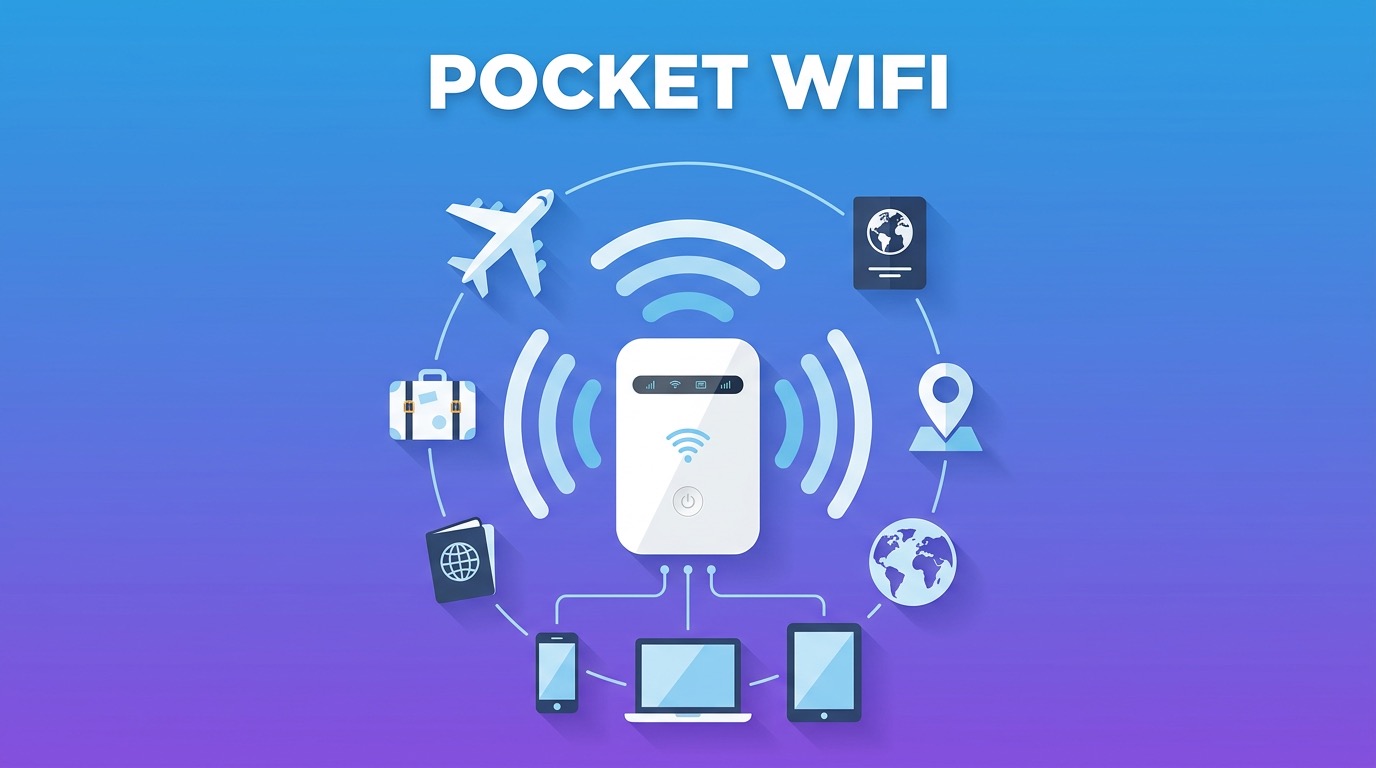
When planning an overseas trip, one of the biggest questions is: "How do I stay connected?" Pocket WiFi, eSIM, local SIM, carrier roaming... too many options, and choosing the wrong one can ruin your trip.
This guide focuses entirely on Pocket WiFi — we'll honestly break down its pros and cons with real travel scenarios, and tell you exactly when it's the right (and wrong) choice.
What Is a Pocket WiFi?
A Pocket WiFi (also called Mobile WiFi Router or MiFi) is a portable wireless router that receives local carrier signals (4G/LTE/5G) and rebroadcasts them as a Wi-Fi hotspot. You connect your devices to it just like you would to a hotel or café Wi-Fi.
How It Works:
- A built-in SIM chip picks up the local carrier signal (4G/5G)
- The device converts it into a Wi-Fi hotspot
- Up to 5–15 devices can connect simultaneously
How to Rent:
- Book online before departure → pick up at airport counter or receive via mail delivery
- Return at the airport or via mail after returning home
✅ 7 Pros of Pocket WiFi

1. Connect Multiple Devices Simultaneously
This is pocket WiFi's greatest strength. One device provides Wi-Fi to smartphones, laptops, tablets, cameras, and smartwatches — all at the same time.
- Typically supports 5–15 simultaneous connections (varies by device)
- Realistically, 3–5 devices connect stably
- Works with any Wi-Fi-capable device regardless of eSIM compatibility
Real Example: A family of 4 traveling Japan connected 2 parent smartphones + 1 child tablet + 1 Wi-Fi camera to a single pocket WiFi device. Much more economical and manageable than buying 4 separate eSIMs.
2. Split Costs in Groups — Huge Savings for 3+ People
For group travel of 3 or more, pocket WiFi can be the most economical option.
Cost Comparison (Japan 7 days, 4 people):
| Option | Total Cost | Per Person |
|---|---|---|
| 1 Pocket WiFi | ~$38 | ~$9.50 |
| eSIM each | ~$60 | ~$15 |
| Carrier Roaming | ~$150 | ~$37.50 |
This advantage only applies when everyone moves together. If the group splits up, connectivity breaks.
3. Works With Any Wi-Fi Capable Device
eSIM has compatibility limitations. Older smartphones, tablets, laptops, and cameras often don't support eSIM. Pocket WiFi works with any device that has Wi-Fi — far greater versatility.
- Older iPhones (iPhone X and below)
- Older Galaxy models
- Windows laptops, MacBooks
- Mirrorless/DSLR cameras (with built-in Wi-Fi)
- Nintendo Switch, iPad
4. Unlimited Data — No Counting Gigabytes
Most pocket WiFi rental plans offer unlimited data by default. Stream Netflix, watch YouTube in 4K, join video calls — no extra charges.
- Truly unlimited plans are the mainstream offering
- Even plans with FUP (Fair Usage Policy) rarely throttle at normal tourist usage levels
- No need to monitor data usage — travel stress-free
Note: Some budget plans throttle speed after 1–2GB per day. Always read the fine print before purchasing.
5. Keep Your Home Phone Number Active
Using pocket WiFi means you keep your existing home SIM card in your phone. You get internet via pocket WiFi while still receiving calls and texts on your home number.
- Receive bank OTPs, credit card verification codes
- Family and colleagues can reach you on your regular number
- All internet calling apps (KakaoTalk, WhatsApp, etc.) work normally
eSIM with dual-SIM configuration can also achieve this, but pocket WiFi is the only option for non-eSIM devices.
6. Multi-Country Plans for Multi-Destination Trips
Backpacking Europe? Southeast Asia multi-country tour? A multi-country pocket WiFi device lets you roam across all countries with a single device.
- Automatic network switching when crossing borders — no manual setup
- No need to swap SIM cards or buy new eSIMs per country
- One device, one worry-free connection throughout your journey
7. Dead Simple to Use — Anyone Can Connect
Setting up is far simpler than installing an eSIM or swapping a physical SIM. Just press the power button, enter the Wi-Fi password, and you're connected.
- Perfect for less tech-savvy travelers (elderly relatives, kids)
- Intuitive operation requires no technical knowledge
- Family members who struggle with tech settings can connect easily
❌ 6 Cons of Pocket WiFi
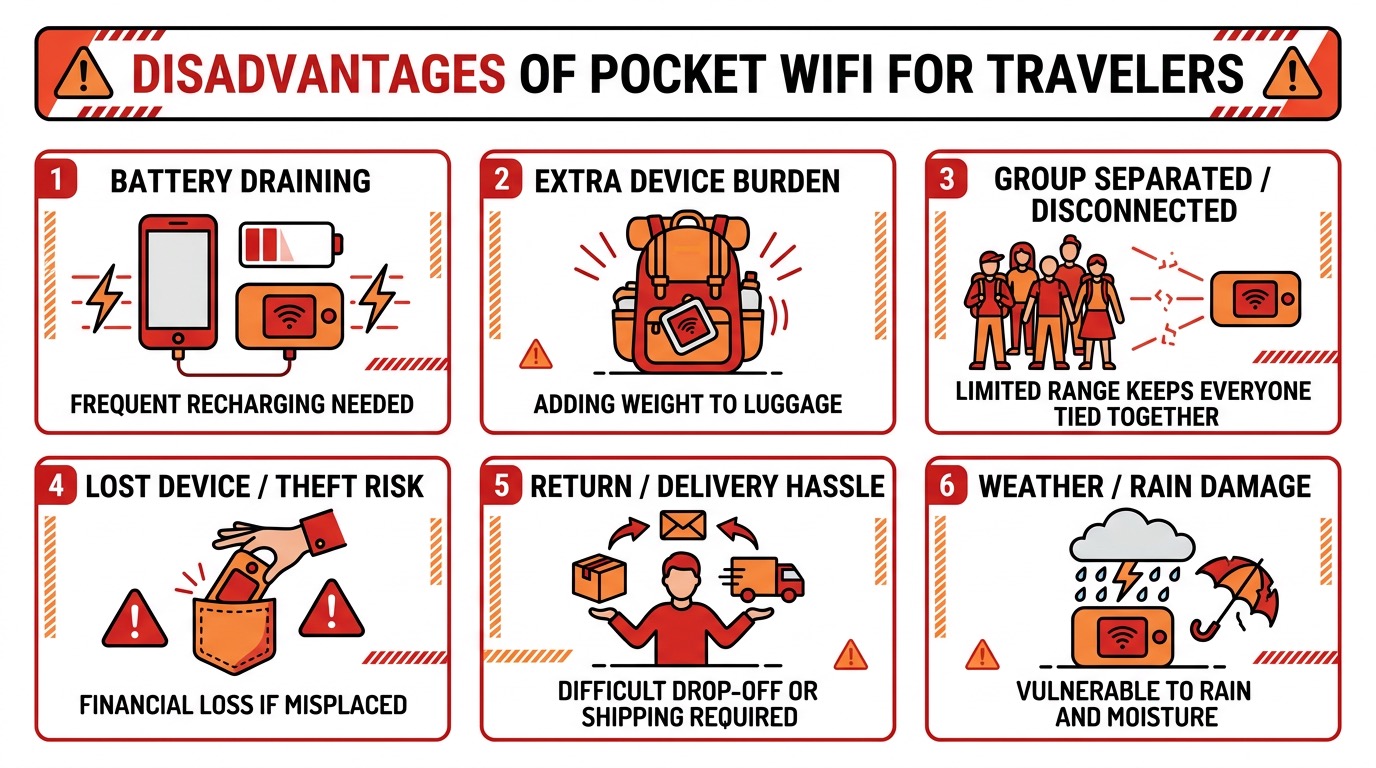
1. Dead Battery = Everyone Loses Internet
This is pocket WiFi's most critical flaw. When the battery dies, every connected device loses internet simultaneously.
Realistic Battery Life:
- Continuous use: 4–6 hours
- Intermittent use: 6–10 hours
- Standby in bag: 8–12 hours
Solutions:
- Carry a 20,000mAh+ power bank
- Charge whenever you stop at a café or restaurant
- Rent an extra battery from some providers (+$3–5/day)
Running out of battery at a theme park when you need the map? That's the nightmare scenario every pocket WiFi user dreads.
2. It's Extra Luggage You Have to Carry
It's one more thing to manage — and with the charging cable and power bank, the total weight and bulk adds up.
Additional items needed:
- Pocket WiFi device (~100–150g)
- Dedicated charging cable (USB-C or Micro-USB)
- Power bank (~300–500g)
- Protective case or pouch
For minimalist travelers or backpackers, this is a real burden.
3. Split From Your Group = No Internet
Pocket WiFi requires everyone to stay within Wi-Fi range (~10–20m). If the person carrying the device goes in a different direction, everyone else loses connectivity.
Real situations where this happens:
- Shopping in different sections of a mall
- Separated while waiting in line at a theme park
- Quick solo bathroom or convenience store trips
- Scattered at airport immigration
Travel forums are full of stories about groups getting lost in Europe because they only rented one pocket WiFi device for their free-roam day.
4. Loss or Damage Can Cost a Fortune
Small devices are easy to lose or damage. Replacement or repair costs can be substantial.
Cost breakdown:
- Lost device: Full security deposit forfeited ($40–80) + additional liability (up to $100–250)
- Physical damage: Repair or replacement cost charged
- Water damage from rain (most devices aren't waterproof)
Prevention:
- Purchase damage insurance (some providers offer it for $0.50–$2/day)
- Use a protective case or ziplock bag
- Keep it in a dedicated pocket, not loose in your bag
5. Pick-Up and Return Process Is a Hassle
Unlike eSIM which activates instantly with a QR code scan, pocket WiFi requires physical pick-up and return.
Pick-up headaches:
- Airport counter: Queue up, limited operating hours, must arrive early
- Home delivery: Must receive day before departure, delivery failures are stressful
- Convenience store pickup: Only specific locations available
Return headaches:
- Airport counter: Navigate to the counter while exhausted from travel
- Mail return: Must ship the same day or next day after arriving home
- Late return fees apply
6. Shared Connection = Slower Speeds Per Device
Pocket WiFi shares a single LTE/5G connection across multiple devices. More simultaneous users means slower speeds per person.
Speed distribution example (50Mbps download):
- 1 device: ~50Mbps
- 3 devices: ~15–20Mbps
- 5 devices: ~8–12Mbps
- 10 devices: ~3–5Mbps
Netflix HD streaming requires 5Mbps, 4K requires 25Mbps. With 5 people streaming simultaneously, you'll experience buffering.
Pocket WiFi vs Other Options: Full Comparison
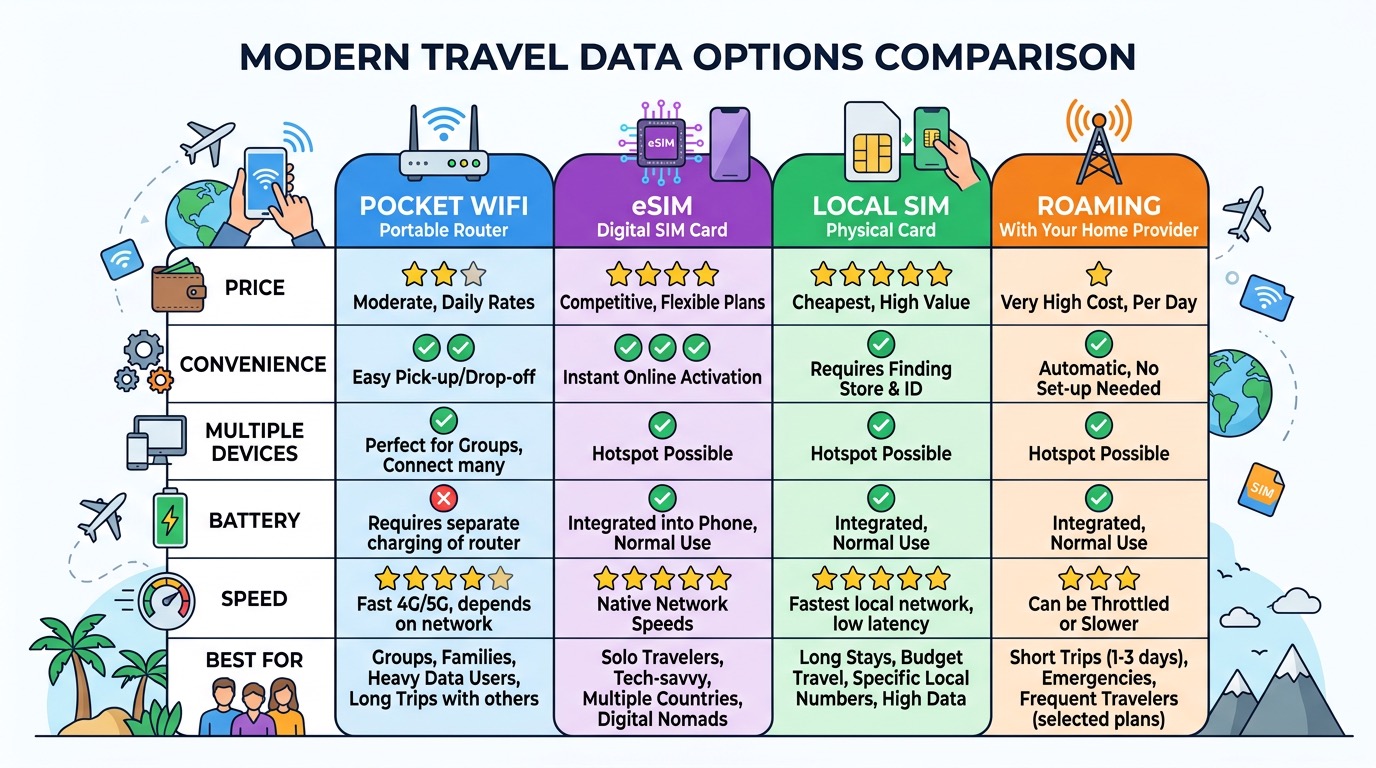
At a Glance
| Category | Pocket WiFi | eSIM | Local SIM | Roaming |
|---|---|---|---|---|
| Cost (per person) | ★★★ | ★★★★ | ★★★★★ | ★★ |
| Convenience | ★★★ | ★★★★★ | ★★★ | ★★★★★ |
| Multi-device | ★★★★★ | ★★★ | ★★★ | ★★★ |
| Battery management | ★★ | ★★★★★ | ★★★★★ | ★★★★★ |
| Loss/damage risk | ★★ | ★★★★★ | ★★★ | ★★★★★ |
| Speed & stability | ★★★★ | ★★★★★ | ★★★★★ | ★★★★ |
| Keep home number | ✅ | ✅ (dual SIM) | ❌ | ✅ |
| Group travel value | ★★★★★ | ★★★ | ★★★ | ★★★ |
Which Option Is Right for You?
🧳 Solo or Couple Travel (1–2 People)
Recommended: eSIM
No cost-splitting benefit, extra luggage, and battery management required. Modern smartphones with eSIM support make eSIM the clear winner.
Exception: If your device doesn't support eSIM, or you need constant laptop connectivity, pocket WiFi is a reasonable choice.
👨👩👧👦 Family or Group Travel (3+ People)
Recommended: Pocket WiFi
For families who travel together, 1–2 pocket WiFi devices are ideal. Setting up eSIM on multiple devices is far more complex than sharing one pocket WiFi hotspot.
Tip: For groups of 5+, rent 2 devices and split into teams. Total cost beats individual eSIMs, and each team stays connected when separated.
💼 Business Travel (Laptop Required)
Recommended: Pocket WiFi or Large-Data eSIM with Tethering
For stable, long-term laptop connectivity, pocket WiFi is superior. It preserves smartphone battery while keeping laptop connected for video calls and large file transfers.
🏔️ Long-Term Stay (30+ Days) or Digital Nomad
Recommended: Local SIM Card
Renting pocket WiFi for 30+ days is prohibitively expensive. Local carrier plans are far cheaper and more stable for extended stays.
🌍 Multi-Country Itinerary
Recommended: Multi-Country Pocket WiFi or Global eSIM
For backpacking multiple countries, a multi-country pocket WiFi or global eSIM plan eliminates per-country SIM hassles. If traveling with companions, pocket WiFi 1 device split N ways saves money.
Money-Saving Tips
- Book early: Reserving 2–3 weeks before departure often saves 10–30%
- Search for coupons: Check provider apps and coupon sites for promo codes
- Compare providers: Prices vary by up to 50% for the same destination and duration
- Choose longer plans: Daily rate on a 10-day plan is often cheaper than a 7-day plan
- Get damage insurance: $0.50–$2/day can save you from $100+ replacement costs
- Bring your own power bank: Buying one abroad is always more expensive
Frequently Asked Questions
Q: How many people can share one pocket WiFi? A: Most devices support 5–15 connections technically, but 3–5 people is the practical sweet spot for decent speeds.
Q: Can I rent pocket WiFi at my destination? A: In some countries (Japan, Taiwan, Thailand), airport rental counters exist. But pre-booking from Korea is almost always cheaper and guarantees availability.
Q: Can I charge it while using it? A: Yes. Connect via USB cable while using — but avoid prolonged simultaneous charging+use as it generates significant heat.
Q: Is it okay to keep it in my bag while connected? A: Not ideal. Enclosed spaces cause overheating. Use a ventilated outer pocket or carry it in hand.
Q: Can I use pocket WiFi even if my phone supports eSIM? A: Yes. Your eSIM-capable phone can still connect to pocket WiFi. In that case, data comes from the pocket WiFi, not your eSIM.
Q: Can I use it on the plane? A: No. All cellular devices must be in airplane mode during flight. Aircraft with in-flight WiFi provide that separately.
Conclusion: When Pocket WiFi Is the Right Choice
Pocket WiFi is the best option when:
✅ Group/family travel with 3+ people who always move together
✅ Multiple devices need simultaneous connection (laptops, tablets)
✅ Non-eSIM devices are the primary devices
✅ Heavy data usage makes unlimited plans necessary
✅ Keeping your home number active is important alongside internet access
eSIM is better when:
❌ Traveling solo or as a couple
❌ Minimizing luggage is a priority
❌ The group frequently splits up
❌ All travelers have modern eSIM-compatible smartphones
Internet connectivity is a key factor in travel quality. Consider your travel style and group size carefully, and make the right choice. If pocket WiFi is your answer, book at least 2 weeks before departure for the best prices.
Related Guides
